AI-Powered Exam Proctoring System
A full-stack web application that analyzes classroom exam videos using AI pose detection to identify potential cheating behavior and provide detailed analytics for reviewers and educators.
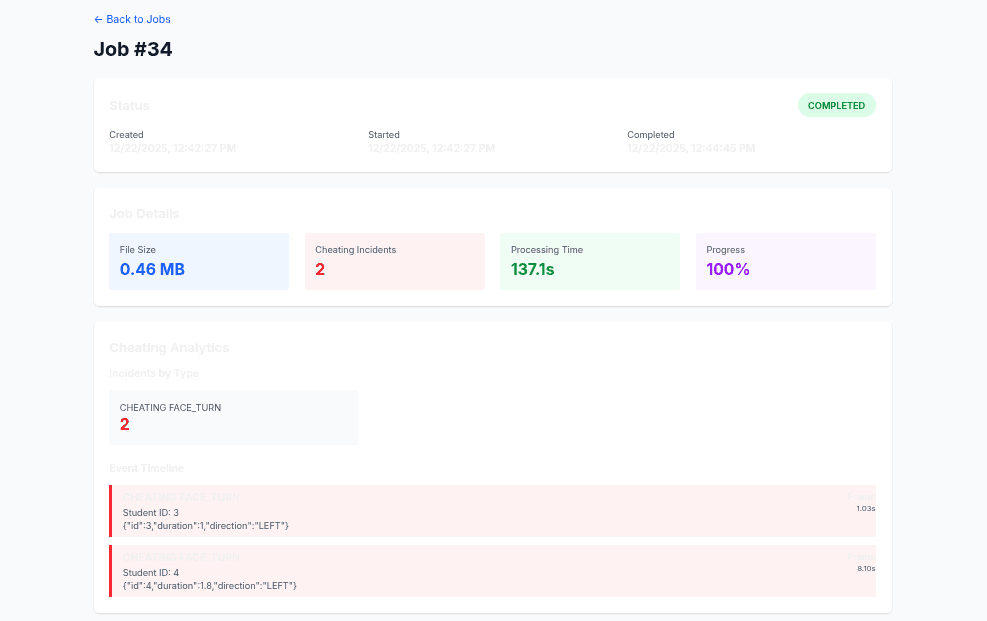
Dashboard view with exam timeline, detected pose events, and per-student analytics
Simply Powerful
We simplify all the moving pieces so you can administer your exams securely and with confidence without technical complexity.
How it works
ProctorVision processes recorded exam sessions in the background, applies pose-based behavior detection, and surfaces potential cheating instances through a focused analytics dashboard.
Upload exam video
Instructors authenticate, create an exam session, and upload invigilation footage through the web dashboard. Videos are queued for background processing without blocking the UI.
AI processes behavior
A Django REST API orchestrates Celery workers that run pose estimation models on each frame batch, flagging events like face turns, body lean, or abnormal head movements.
Review analytics & export
The Next.js dashboard surfaces timelines, per-student statistics, and event summaries, with options to download overlaid output videos and structured analytics for offline review.
Save Time Marking
Auto-marked exams allow you to save time marking so that you can focus on more meaningful tasks and deliver feedback to your students promptly.
Ensure Academic Integrity
Advanced AI-powered proctoring features detect suspicious behavior patterns and maintain exam security without manual supervision.
Real-time Dashboard
Monitor student progress through assessments with live insights into strengths, weaknesses, and difficulty levels of various exam sections.
Automate Workflow
Streamline exam administration with automated scheduling, video processing queues, and one-click result exports.
Features
Full-stack implementation combining Django REST API backend with Next.js TypeScript frontend, emphasizing background processing and clear observability for exam sessions.
User authentication & roles
Token-based authentication backed by Django REST, with role separation for administrators and instructors to manage exam sessions securely.
Video upload & storage
Chunked video uploads from the Next.js client, persisted to object storage and registered in the processing queue with metadata and exam context.
AI cheating detection
Pose estimation pipeline detects head turns, body lean, and gaze deviations across the exam duration, aggregating events into interpretable summaries.
Background processing with Celery
Celery workers consume processing jobs from a task queue, enabling scalable, non-blocking analysis of multiple exam videos in parallel.
Detailed analytics dashboard
A responsive dashboard in Next.js visualizes per-student risk scores, event distributions, and time-based activity aligned with the exam timeline.
Downloadable processed videos
Export processed videos with overlays highlighting detected events, alongside CSV summaries for further educational or research analysis.
See it in action
This project is intended as a technical showcase of full-stack AI integration. The demo instance runs a subset of the full pipeline for reproducible experimentation.
The demo walkthrough covers creating an exam, uploading a sample video, observing processing status, and reviewing the resulting analytics.
Demo access
Use the following test credentials to explore the dashboard:
Note: The demo environment is reset periodically and should be used only for sample data and non-production workloads.
Ready to get started?
30-day free trial · No credit card required